Navigating Capacity Challenges on AKS with Node Auto Provisioning or Virtual Machine Node Pools

When Growth Meets a Wall
Imagine this: your application is thriving, traffic spikes, and Kubernetes promises elasticity. You hit “scale,” expecting seamless provisioning - only to be greeted by errors like:
- SkuNotAvailable: The VM size (also referred to as VM SKU) you requested is not available.
- AllocationFailed: Azure can’t allocate the specific VM size with the constraints you requested in a particular region.
- Quota exceeded: Your subscription has hit its compute limits for a particular location or VM size.
- ZonalAllocationFailed: Azure can’t allocate the VM size with the constraints you requested in a particular zone.
- OverconstrainedAllocationRequest: Azure can’t allocate the specific VM size with the constraints you requested in a particular region.
- OverconstrainedZonalAllocationRequest: Azure can’t allocate the VM size with the constraints you requested in a particular zone.
For customers, these aren’t just error messages - they’re roadblocks. Pods remain pending, deployments stall, and SLAs tremble. Scaling isn’t just about adding nodes; it’s about finding capacity in a dynamic, multi-tenant cloud where demand often outpaces supply. In the case of quota gaps, usually users can increase their quotas in a particular location - but what about when a specific virtual machine size (also known as a "VM SKU") is simply unavailable? This can cause many challenges for users.
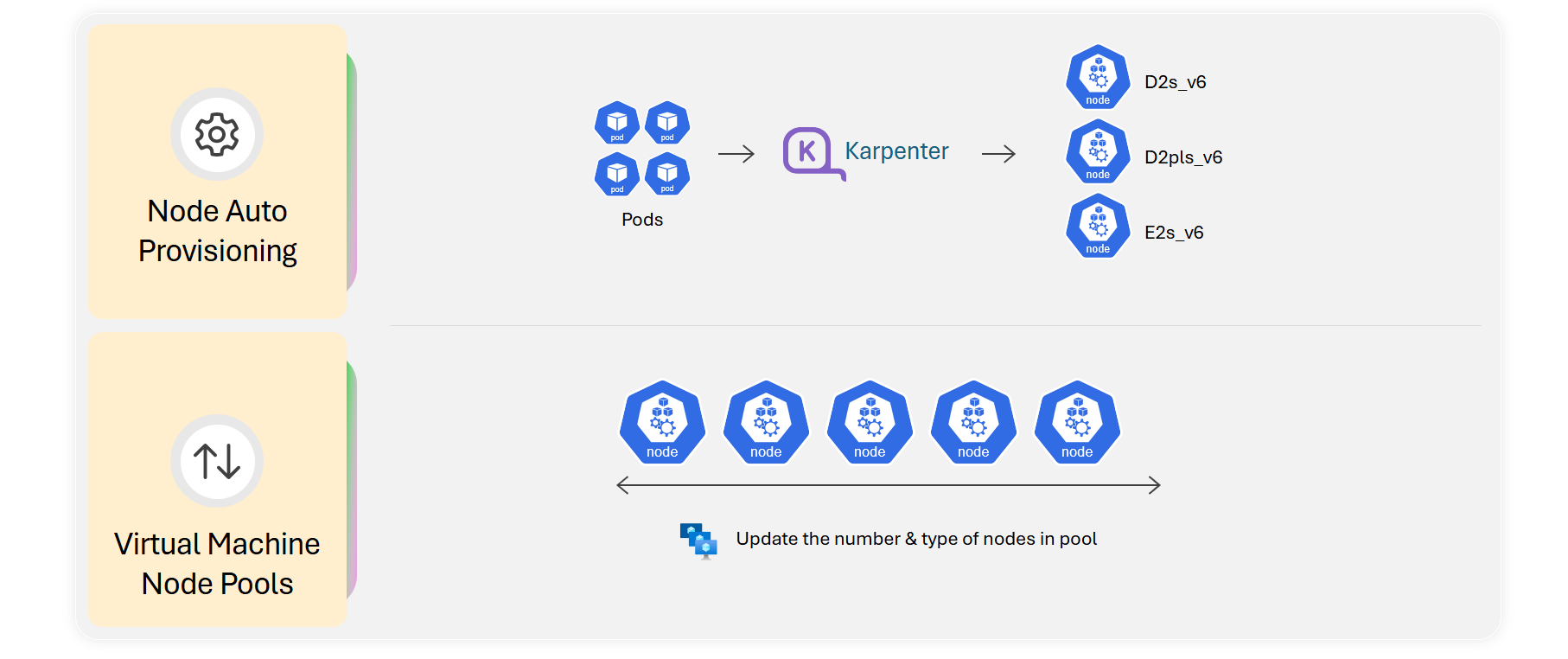
Learn more in the official documentation: Node Auto Provisioning or virtual machine node pools
The Hidden Complexity Behind Capacity
When using Kubernetes, every node pool is typically tied to a specific VM SKU, region, and zone, which can require some effort to update. In some scaling scenarios, high-demand VM SKUs can become unavailable in certain regions or zones. In this case, limiting node pools to a single VM size becomes a bottleneck that can result in capacity errors and an outage. You’re left juggling trade-offs: Do you overprovision SKUs “just in case” to ensure availability? Or risk underprovisioning and inability to scale? AKS offers two solutions that aim to address these capacity scaling challenges.
Breaking the Mold: Features That Change the Game
Node Auto Provisioning (NAP): Smarter Scaling
NAP offers a more intelligent scaling experience. Instead of you guessing the right VM size and precreating node pools, NAP uses pending pod resource requests to dynamically provision nodes that fit your workloads. Built on the open-source Karpenter project, NAP:
- Automates VM selection: Chooses optimal SKUs based on CPU, memory, and constraints
- Consolidates intelligently: Removes underutilized nodes, reducing cost
- Adapts in real time: Responds to pod pressure without manual intervention
Think of NAP as Kubernetes with foresight: provisioning what you need, when you need it, without the spreadsheet gymnastics. Without NAP, a single unavailable VM SKU can block scaling entirely. With NAP, AKS dynamically adapts to capacity fluctuations, ensuring workloads keep running on available VM sizes, even during regional/zonal shortages.
How NAP handles capacity errors
When a requested VM SKU isn’t available due to regional or zonal capacity constraints, NAP doesn’t fail outright. Instead, NAP will automatically:
- Evaluate pending pod resource requirements (for example CPU, memory, GPU)
- Check if pending pods can fit on existing nodes
- Search across multiple VM SKUs within the allowed families defined in your NAP configuration files, which are custom resource definitions (CRDs) named NodePool and AKSNodeClass
- Provision an alternative SKU that meets the workload requirements and policy constraints
In the event that no VM sizes that match your requirements are available, NAP will only then send an error detailing that "No available SKU that meets your configuration definition is available." To mitigate this, make sure you reference a broad range of size options in the NAP configuration files (for example D-series, or multiple SKU families).
This flexibility is key to avoiding hard failures during scale-out. In the scenario where there are no SKUs available based on your configuration requirements, NAP will return an error stating that there were no available SKUs that matched your requirements. Typically this means the configuration requirements probably can be broader, to allow for more available VM sizes.
NAP vs Cluster Autoscaler
In traditional Kubernetes, Cluster Autoscaler is the standard autoscaling experience that scales pre-existing same VM size node pools. The requirement for same size autoscaling is subject to availability limits of the selected VM sizes, and Cluster Autoscaler does not allow for changing the node pool's VM SKU. Should the specific SKU be unavailable, a capacity error occurs and your workloads are now stuck. To overcome this limitation, you may have to pre-create multiple node pools with different VM SKUs to avoid capacity exhaustion which introduces operational complexities. When zonal allocation constraints are also factored in, the complexity of traditional node pools increase further. In such scenarios, cluster autoscaler configurations may require one node pool per zone for each VM SKU to reliably scale.
NAP offers a new model based on individual virtual machines rather than node pools or Virtual Machine Scale Sets. NAP also provides versatility that can offer more capacity resilience and more cost optimization than traditional node pools using Cluster Autoscaler. Many of the capacity limitations and work-arounds are addressed with NAP.
For more on enabling NAP on your cluster, visit our NAP documentation as well as our docs on configuring the NodePool CRD and AKSNodeClass CRD.
Virtual Machine Node Pools: Flexibility at Scale
Traditional node pools are rigid: one VM size per node pool. Virtual machine node pools break that limitation. With multi-SKU support, you can:
- Mix VM sizes within a single node pool for diverse workloads
- Fine-tune capacity without creating dozens of node pools
- Reduce operational overhead while improving resilience
Virtual machine node pools provide flexibility and versatility in capacity-constrained regions.
How virtual machine node pools handle capacity errors
You can manually add or update alternative VM SKUs into your new or existing node pools. When a requested VM SKU isn't available due to a regional or zonal capacity constraint, you will receive a capacity error, and can resolve this error by simply adding and updating the VM SKUs in your node pools.
For more on enabling Virtual machine node pools on your cluster, visit our Virtual machine node pools documentation.
Quick Guidance: When to Use What
Generally, NAP and virtual machine node pools are mutually exclusive options. You can use NAP to create standalone VMs that NAP manages instead of traditional node pools, allowing for mixed SKU autoscaling. Virtual machine node pools use traditional node pools and allow for mixed SKU manual scaling.
- (Recommended) Choose NAP for dynamic environments or specific SKU selection where manual SKU planning is impractical.
- Choose virtual machine node pools when you need fine-tuned control with exact VM SKUs for compliance, predictable performance, or cost modeling
Avoid NAP if you require strict SKU governance or have regulatory constraints that cannot allow for dynamic autoscaling. Avoid VM node pools if you want full automation without manual profiles.
Best Practices for Resilience
To maximize NAP's ability to handle capacity errors:
- Define broad SKU families (e.g., D, E) in your NodePool requirements
- Avoid overly restrictive affinity rules. Visit our node selector and affinity best practices documentation for more details
- Enable multiple NodePools with different priorities for fallback. Visit our NAP Node Pool documentation to learn more
To maximize virtual machine node pool's ability to adapt to capacity errors:
- Be clear on a list of VM SKUs that can tolerate your workloads. Visit our Azure VM Sizes documentation for more details
- Create virtual machine node pools to offer resiliency to your workloads. Visit our virtual machine node pool documentation on how to add a mixed SKU node pool
Getting Started with Node Auto Provisioning
Before you begin, visit our NAP documentation on minimum cluster requirements.
Create a new NAP-managed AKS cluster
The following command creates a new NAP-managed AKS cluster by setting the --node-provisioning-mode field to Auto. This command also sets the network configuration to the recommended Azure CNI Overlay with a Cilium dataplane (optional). View our NAP networking documentation for more on supported CNI options.
az aks create --name $CLUSTER_NAME --resource-group $RESOURCE_GROUP --node-provisioning-mode Auto --network-plugin azure --network-plugin-mode overlay --network-dataplane cilium
Update an existing cluster to be a NAP-managed cluster
The following command updates an existing cluster to enable NAP:
az aks update --name $CLUSTER_NAME --resource-group $RESOURCE_GROUP --node-provisioning-mode Auto
Configure NAP CustomResourceDefinitions
NAP uses CustomResourceDefinitions (CRDs) and your application deployment file requirements for its decision-making. The Karpenter controller takes this information and determines which virtual machines to provision and schedule your workloads to. Karpenter CRD types include:
- NodePool - for setting rules around the range of VM sizes, capacity type (spot vs. on-demand), compute architecture, availability zones, etc
- AKSNodeClass - for setting rules around certain Azure specific settings such as more detailed networking (virtual networks) setup, node image family type, operating system configurations, and other resource-related definitions
Visit our NAP NodePool Documentation and NAP AKSNodeClass documentation for more on configuring these files.
Getting started with virtual machine node pools
Create a new AKS cluster with virtual machine node pools
The following example creates a new cluster named myAKSCluster with a virtual machine node pool containing two nodes with size "Standard_D4s_v3", and sets the Kubernetes version to 1.31.0:
az aks create --resource-group myResourceGroup --name myAKSCluster \
  --vm-set-type "VirtualMachines" --vm-sizes "Standard_D4s_v3" \
  --node-count 2 --kubernetes-version 1.31.0
Add a new virtual machine node pool to an existing cluster
The following example adds a virtual machine node pool named myvmpool to the myAKSCluster cluster. The node pool creates a ManualScaleProfile with --vm-sizes set to Standard_D4s_v3 and a --node-count of 3:
az aks nodepool add --resource-group myResourceGroup --cluster-name myAKSCluster --name myvmpool --vm-set-type "VirtualMachines" --vm-sizes "Standard_D4s_v3" --node-count 3
With virtual machine node pools you can also perform some of the following commands:
- Add multiple VM sizes in an existing or new node pool
- Update VM sizes in an existing node pool
- Single-SKU autoscaling (public preview)
- Delete VM sizes in an existing node pool
Visit our virtual machine node pools documentation for more info.
Upcoming experiences on the AKS roadmap
- NAP: Expect deeper integration with cost optimization tools and advanced disruption policies for even smarter consolidation.
- Virtual machine node pools: Multi-SKU autoscaling (general availability) is on the horizon, reducing manual configuration and enabling adaptive scaling across mixed SKUs.
Next steps
Ready to get started?
- Try one of these features now: Follow the Enable Node Auto Provisioning steps or create a virtual machine node pool.
- Share feedback: Open issues or ideas in AKS GitHub Issues.
- Join the community: Subscribe to the AKS Community YouTube and follow @theakscommunity on X.