Azure Container Registry Repository Permissions with Attribute-based Access Control (ABAC)

Enterprises are converging on centralized container registries that serve multiple business units and application domains. Azure role-based access control (RBAC) uses role assignments to control access to Azure resources. Each Azure RBAC role assignment specifies an identity (who will gain permissions), an Azure role with Entra actions and data actions (what permissions are granted), and an assignment scope (which resources). For Azure Container Registry (ACR), traditional Azure RBAC scopes are limited to the subscription, resource group, or registry level—meaning permissions apply to all repositories within a registry.
In this shared registry model, traditional Azure role-based access control (RBAC) forces an all-or-nothing choice: either grant broad registry-wide permissions or manage separate registries per team. Neither approach aligns with least-privilege principles or modern zero trust architectures.
Microsoft Entra attribute-based access control (ABAC) for Azure Container Registry solves this challenge. ABAC augments Azure RBAC with fine-grained conditions, enabling platform teams to scope permissions precisely to specific repositories or namespaces within a shared registry. CI/CD pipelines and Azure Kubernetes Service (AKS) clusters can now access only their authorized repositories, eliminating overprivileged authorization while maintaining operational simplicity.

How ABAC works in ACR
Attribute-based access control (ABAC) extends the traditional RBAC model by introducing attributes on top of actions and data actions. While RBAC defines who (identity) can perform what permissions (Entra actions and data actions in a role definition) on which resource scope (subscription, resource group, or registry), ABAC adds a fourth dimension: attributes. Attributes—such as repository name patterns—are properties of the resource being accessed. ABAC uses conditions in role assignments to evaluate these attributes and determine whether access should be granted.
For ACR, this means that while the scope of a role assignment can be at the subscription, resource group, or registry level, ABAC conditions evaluate repository-level attributes like repositories:name to determine whether a specific permission (such as repositories/content/read) is permitted. This allows administrators to scope permissions to specific repositories or namespace prefixes within a single registry, without needing separate registries or overprivileged access.
ACR registries support a permissions mode called "RBAC Registry + ABAC Repository Permissions" that makes them ABAC-enabled. Once configured, registry administrators add ABAC conditions to standard Azure RBAC role assignments, scoping permissions to specific repositories or namespace prefixes. This enables:
- CI/CD pipelines to push images only to their approved namespaces and repositories
- AKS clusters, Azure Container Apps, and Azure Container Instances to pull only from authorized repositories
- Microsoft Entra identities to enforce permission boundaries through standard role assignments
Enabling ABAC on ACR
By default, ACR registries use the "RBAC Registry Permissions" authorization mode, which provides traditional registry-scoped access control. ABAC can be enabled on all new and existing ACR registries across all SKUs by changing the authorization mode to "RBAC Registry + ABAC Repository Permissions", either during registry creation or configured on existing registries. You can assign RBAC roles with optional ABAC conditions to users, groups, service principals, and managed identities used by resources such as Azure Kubernetes Service (AKS), Azure Container Apps (ACA), and Azure Container Instances (ACI) when pulling images from ACR.
Here is the Azure Portal experience for enabling ABAC on a new ACR during creation:
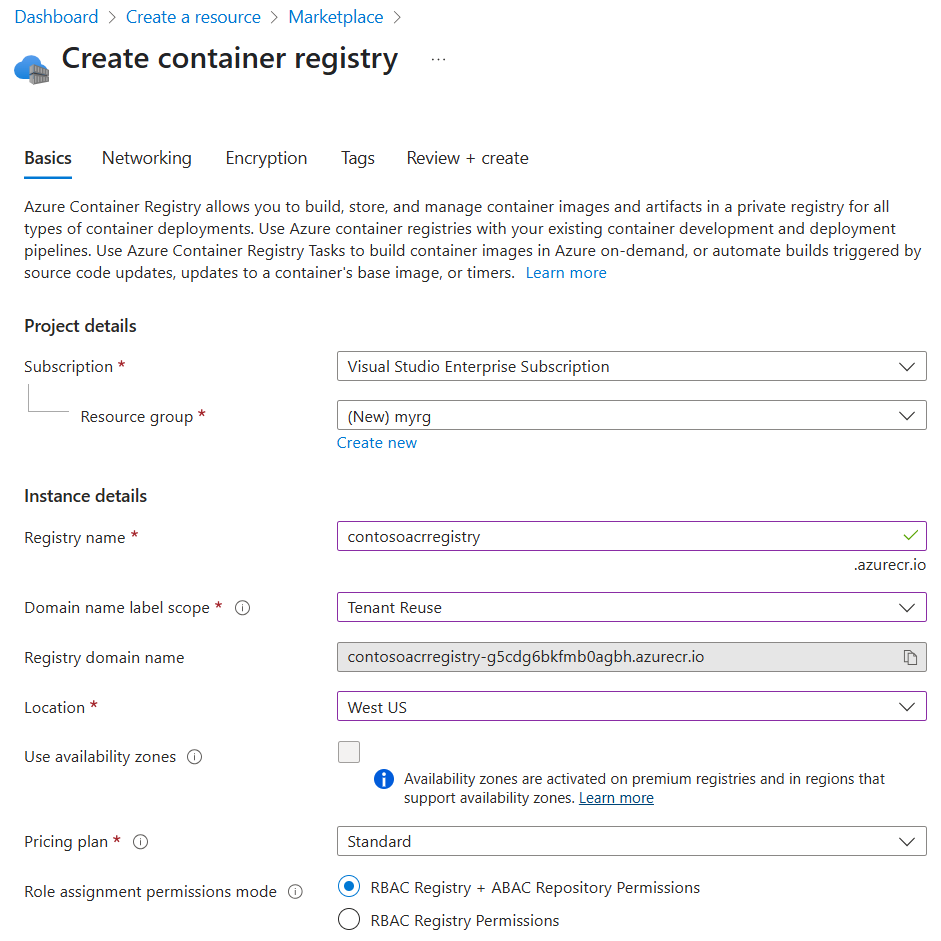
Here is the Azure Portal experience for enabling ABAC on an existing ACR:

ABAC can also be enabled on ACR registries through Azure Resource Manager (ARM), Bicep files, Terraform templates, and Azure CLI.
ABAC-enabled built-in roles
Once a registry is ABAC-enabled (configured to "RBAC Registry + ABAC Repository Permissions"), registry admins can use these ABAC-enabled built-in roles to grant repository-scoped permissions:
- Container Registry Repository Reader: grants image pull and metadata read permissions, including permissions for
HEADrequests,GETmanifest requests,GETlayer blob requests, tag resolution, and discovering OCI referrers. - Container Registry Repository Writer: grants Repository Reader permissions, as well as image and tag push permissions.
- Container Registry Repository Contributor: grants Repository Reader and Repository Writer permissions, as well as image and tag delete permissions.
Note that these roles do not grant repository list permissions.
- The separate Container Registry Repository Catalog Lister must be assigned to grant repository list permissions.
- The Container Registry Repository Catalog Lister role does not support ABAC conditions in role assignments; assigning this role grants permissions to list all repositories in a registry.
Assigning roles with ABAC conditions
After enabling ABAC on your registry, you can create role assignments with conditions that scope permissions to specific repositories. Here's an example using Azure CLI to grant a managed identity read access to repositories matching the myapp/* namespace:
az role assignment create \
  --assignee "<managed-identity-principal-id>" \
  --role "Container Registry Repository Reader" \
  --scope "/subscriptions/<subscription-id>/resourceGroups/<resource-group>/providers/Microsoft.ContainerRegistry/registries/<registry-name>" \
  --condition "((!(ActionMatches{'Microsoft.ContainerRegistry/registries/repositories/content/read'})) OR (@Resource[Microsoft.ContainerRegistry/registries/repositories:name] StringStartsWith 'myapp/'))" \
  --condition-version "2.0"
In the Azure Portal, navigate to your registry's Access control (IAM) blade, select Add role assignment, choose an ABAC-enabled role, and configure conditions in the Conditions tab to specify repository name patterns.
ABAC conditions in Azure are fail-closed by default. If a condition cannot be evaluated (for example, due to a missing attribute), access is denied. This ensures that misconfigured conditions do not inadvertently grant broader access than intended.
Important role behavior changes in ABAC mode
When a registry is ABAC-enabled by configuring its permissions mode to "RBAC Registry + ABAC Repository Permissions", existing built-in roles and role assignments will have different behaviors and will no longer grant the same set of permissions to ACR registries.
- Legacy data-plane roles such as AcrPull, AcrPush, and AcrDelete are not honored in ABAC-enabled registries and should not be used. For ABAC-enabled registries, use the ABAC-enabled built-in roles listed above.
- Broad roles like Owner, Contributor, and Reader previously granted full control plane and data plane permissions. This is typically an overprivileged role assignment. In ABAC-enabled registries, these broad roles will only grant control plane permissions to the registry. Owner, Contributor, and Reader will no longer grant data plane permissions, such as image push, pull, delete, or repository list permissions.
- In ABAC-enabled registries, ACR Tasks, Quick Tasks, Quick Builds, and Quick Runs no longer have default data plane access to source registries. This prevents inadvertent security leaks and broad permissions grants to ACR Tasks. To grant an ACR Task permissions to a source ACR registry, assign the ABAC-enabled roles above to the calling identity of the Task or Task Run as needed.
Next steps
Start using ABAC repository permissions in ACR to enforce least-privilege artifact push, pull, and delete boundaries across your CI/CD systems and container image workloads. This model is now the recommended approach for multi-tenant platform engineering patterns to secure container registry deployments.
To get started, follow the step-by-step guides in the official ACR ABAC documentation.